How Computer Monitors Work

This resource will help explain how a flat-screen or tube-type computer monitor works as an aid for both the novice and learning service technician.

Flat screen or flat panel monitors are connected to computers and other devices using Display Port (DP), Digital Video Interface (DVI), High-Definition Multimedia Interface (HDMI), or older-style analog Video Graphics Array (VGA) data connections.

Flat screen or flat panel monitors are connected to computers and other devices using Display Port (DP), Digital Video Interface (DVI), High-Definition Multimedia Interface (HDMI), or older-style analog Video Graphics Array (VGA) data connections.

A more detailed explanation

A computer monitor works by receiving signals from a computer's graphics card, interpreting the data, and displaying the information on the screen. Here's how it works in more detail: Central processing unit (CPU): The CPU sends image data to the graphics processing unit (GPU). Graphics processing unit (GPU): The GPU translates the image data into bitmaps and transmits them to the display. Display: The display renders the image from a sequence of bits that describe the color values for specific X and Y coordinates.

Monitors are connected to a computer using a data cable, such as HDMI, DisplayPort, DVI, or VGA. The ports on the monitor and computer will indicate where the cable needs to be plugged in.

Some types of computer monitors include: * Cathode-ray tube (CRT) The most common technology in desktop displays before the mid-2000s. CRT monitors are bulky because they require a certain distance between the beam projection device and the screen.
* Liquid crystal display (LCD) Works by blocking light rather than creating it. LCDs are the primary technology for notebook and other mobile computers.
* Light-emitting diode (LED) Works by lighting up display screen positions based on the voltages at different grid intersections.

Other factors involved

Resolution refers to the number of individual dots of color, known as pixels, contained on a display. Resolution is expressed by identifying the number of pixels on the horizontal axis (rows) and the number on the vertical axis (columns), such as 800x600. Resolution is affected by a number of factors, including the size of the screen.

As monitor sizes have increased over the years, display standards and resolutions have changed.

Common Display Standards and Resolutions 

In addition to the screen size, display standards and resolutions are related to something called the aspect ratio.

By: Jeff Tyson & Carmen Carmack

Aspect Ratio and Viewable Area
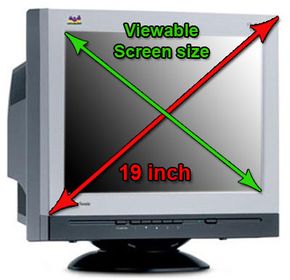
CRT screen size

Two measures describe the size of your display: the aspect ratio and the screen size. Historically, computer displays, like most televisions, have had an aspect ratio of 4:3. This means that the ratio of the width of the display screen to the height is 4 to 3.

For widescreen LCD monitors, the aspect ratio is 16:9 (or sometimes 16:10 or 15:9). Widescreen LCD displays are useful for viewing DVD movies in widescreen format, playing games and displaying multiple windows side by side. High definition television (HDTV) also uses a widescreen aspect ratio.

Advertisement

All types of displays include a projection surface, commonly referred to as the screen. Screen sizes are normally measured in inches from one corner to the corner diagonally across from it. This diagonal measuring system actually came about because the early television manufacturers wanted to make the screen size of their TVs sound more impressive.

Interestingly, the way in which the screen size is measured for CRT and LCD monitors is different. For CRT monitors, screen size is measured diagonally from outside edges of the display casing. In other words, the exterior casing is included in the measurement as seen below.

For LCD monitors, screen size is measured diagonally from the inside of the beveled edge. The measurement does not include the casing as indicated in the image below.
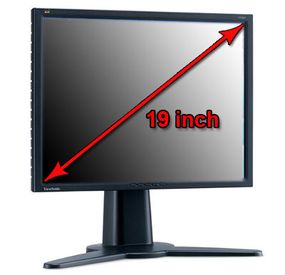
LCD screen size

­Because of the differences in how CRT and LCD monitors are measured, a 17-inch LCD display is comparable to a 19-inch CRT display. For a more accurate representation of a CRT's size, find out its viewable screen size. This is the measurement of a CRT display without its outside casing.

­ Popular screen sizes are 15, 17, 19 and 21 inches. Notebook screen sizes are smaller, typically ranging from 12 to 17 inches. As technologies improve in both desktop and notebook displays, even larger screen sizes are becoming available. For professional applications, such as medical imaging or public information displays, some LCD monitors are 40 inches or larger!

Obviously, the size of the display directly affects resolution. The same pixel resolution is sharper on a smaller monitor and fuzzier on a larger monitor because the same number of pixels is spread out over a larger number of inches. An image on a 21-inch monitor with an 800x600 resolution will not appear nearly as sharp as it would on a 15-inch display at 800x600. ­